You don’t need to spend a single rupee (or dollar) to get AI superpowers as a student. In 2026, some of the best free AI tools for students are so good, they’re making paid tools look ordinary.
Let’s be real — student life is expensive enough. Between textbooks, subscriptions, and rent, adding another paid AI tool to the list feels painful. The good news? You don’t have to. A quiet revolution has happened in the AI world: free AI tools have caught up — and in many cases, overtaken — their paid competitors.
I personally tested a few of these tools while working on assignments, and tools like Claude and NotebookLM saved me hours.
This post breaks down the best free AI tools for students in 2026, what each one is great at, and why you might not need to pay for premium plans at all.
Why free AI tools have gotten so good
A year or two ago, free AI tools were limited — slower, less accurate, and capped after just a few uses. But competition between companies like Google, Meta, Microsoft, and Anthropic has pushed everyone to make their free tiers genuinely useful. Today, the free version of many AI tools offers features that would have cost ₹200–₹300 /month just two years ago.
The best free AI tools for students (2026 edition)
Writing + Research
✦ Claude (by Anthropic)
Claude’s free tier is a hidden gem. It’s great for brainstorming essays, summarising long articles, explaining difficult concepts in simple language, and even reviewing your writing for clarity. What makes Claude stand out is that it actually reasons through problems instead of just guessing — which makes it incredibly reliable for academic tasks. It handles long documents well too, so you can paste an entire research paper and ask it to break down the key findings.
Study + Notes
✦ Google NotebookLM
NotebookLM is completely free and it is one of the smartest study tools available right now. You upload your PDFs, lecture slides, or notes — and it becomes a personal AI tutor that answers questions only from your sources. No hallucinations, no made-up facts. It even generates audio summaries so you can listen to your notes like a podcast while commuting.
Research
✦ Perplexity AI
Think of Perplexity as a smarter search engine. It searches the web in real time and gives you cited, summarised answers — perfect when you’re trying to understand a topic quickly or find up-to-date information for an assignment. The free version is generous, and for most research tasks, it rivals or beats paid tools like ChatGPT Plus’s browsing mode.
Design + Presentations
✦ Canva AI (Free Plan)
Canva’s free AI features — including Magic Write and AI image generation — let you build stunning presentations, posters, and infographics in minutes. For students who need to present projects, this is a game changer. Many paid design tools simply don’t offer this level of creative AI assistance in their free tiers.
Lecture Transcription
✦ Otter.ai (Free Plan)
Never miss a word in a lecture again. Otter.ai transcribes audio in real time and even highlights key moments. The free plan gives you 300 minutes of transcription per month — more than enough for most students. Paid transcription services charge a monthly fee for the same quality.
Academic Research
✦ Consensus AI
Consensus is built specifically for students and researchers. You type a question, and it pulls evidence-backed answers from peer-reviewed papers. The free version gives you a solid number of searches per month, which is enough for most coursework. It essentially replaces hours of manual literature review.
How to get the most out of free AI tools
Pro tip for students : Stack your tools. Use Perplexity to find sources, NotebookLM to study them, Claude to write and edit, and Canva AI to present. That’s a full academic workflow — entirely free.
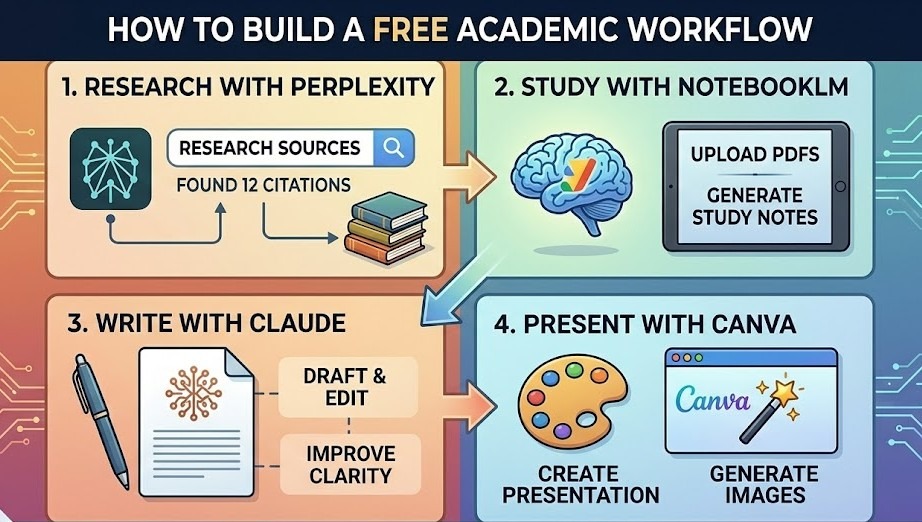
The key is knowing which tool to reach for. Don’t use one AI for everything — each has a strength. Claude is brilliant at nuanced writing and explanation. Perplexity is fastest for research. NotebookLM is best when you need accuracy from your own materials. Mix and match, and you’ll outperform students paying for single expensive subscriptions.
Also, always review AI output. These tools are assistants, not replacements for your own thinking. The students who do best with AI are those who use it to accelerate their work — not hand it over entirely.
Should you ever pay for AI tools?
Occasionally, yes. If you’re doing very heavy coding work, you might benefit from a paid GitHub Copilot plan. If you’re writing an essay with hundreds of sources, a paid Zotero or Elicit plan could save time. But for the majority of students handling everyday assignments, research, and presentations, the best free AI tools in 2026 are not only more than enough but also to get the job done — and done well.
The bottom line
Free doesn’t mean weak anymore. The best free AI tools for students available today are powerful, fast, and genuinely helpful. Whether you’re writing an essay at midnight, preparing for an exam, or building a presentation, there’s a free AI tool that can help — no credit card required. If you start using even 2–3 of these tools properly, you’ll notice a huge difference in how fast and effectively you study.
Frequently asked questions
Everything students commonly ask about free AI tools in 2026.
Yes — in 2026, free AI tools are good enough for college-level work. Tools like Claude, Google NotebookLM, and Perplexity AI can help with essays, research, exams, and presentations. For most student tasks, free plans work perfectly without major limitations.
It depends on your school’s rules. Most colleges allow AI for research and idea help, but not for submitting AI-generated work as your own. Use AI to learn and organize ideas, and always follow your teacher’s guidelines.
Claude is one of the best free tools for essay writing. It understands context well, creates clear and structured content, and helps improve drafts. You can use it to refine arguments, edit sections, and simplify sentences for free.
Yes! Most tools like Claude, Perplexity AI, and Otter.ai have mobile apps for Android and iOS. Google NotebookLM also works well on mobile browsers, so you can study anytime on your phone.
Yes, some tools have limits. For example, Otter.ai offers limited transcription minutes, Perplexity AI limits advanced searches, and Claude has a daily message cap. But these limits are usually enough for regular study. You can avoid them by using different tools for different tasks.
It depends on the tool. Platforms like Google NotebookLM are generally secure, and most trusted AI tools have clear privacy policies. However, you should avoid uploading sensitive or confidential information and always check the tool’s privacy policy.
Yes, absolutely. AI literacy is becoming as important as basic literature. No matter what your field is, AI tools can save time and improve productivity. Starting early helps you build valuable skills for your future career.
- ChatGPT Review for Students in 2026: Is It Still the Best AI Study Partner?
- Free AI Tools for Students That Beat Paid Ones in 2026
- ChatGPT vs Perplexity for students: Which AI Tool is Best for Students in 2026?
- The Best AI Study Tools Every Student Needs in 2026
To know more about AI Tools : click here>>>>