Tag: AI Tools

  • ChatGPT Review for Students in 2026: Is It Still the Best AI Study Partner?

    ChatGPT Review for Students in 2026: Is It Still the Best AI Study Partner?

    When it comes to AI tools for students in 2026, ChatGPT remains first in everyone’s mind. Launched by OpenAI back in late 2022, it has since grown into a full-blown academic companion — one that all students around the world rely on daily for everything from essay writing to solving complex calculus problems and sometimes even as a chatting partner. But is it actually worth its hype? Let’s break it down honestly.

    What Category Does ChatGPT Fit Best?

    Out of all the category out their it shines brightest as an Academic Tutoring and Writing Assistant. It’s not just a chatbot — it’s more like having a patient tutor available at 3 AM who won’t judge you for not knowing what a thesis statement is. Whether you’re stuck on a history essay, need a concept explained five different ways, or want feedback on your draft, ChatGPT handles it all in one place.

    The Good Stuff: Where ChatGPT Actually Delivers

    1. Explaining Complex Topics in Plain English

    This is genuinely where ChatGPT is hard to beat. Ask it to explain quantum entanglement like you’re twelve years old, and it’ll do exactly that — clearly, patiently, and with examples. For students in STEM especially, this is a game-changer. No more staring blankly at a textbook until it turns transparent.

    2. Writing Support Without Doing the Work for You (If You Use It Right)

    ChatGPT can help you outline essays, improve sentence structure, fix grammar, and suggest stronger arguments. If used responsibly, it’s like a writing tutor in your pocket which you can use whenever you want. It’s one of the most capable AI writing assistants for students currently available.

    3. 24/7 Availability

    No office hours. No scheduling. No waiting. This alone makes it extremely valuable for students managing part-time jobs, family responsibilities, or different time zones.

    4. Multi-Subject Range

    From Shakespeare analysis to Python debugging to economic theories — ChatGPT honestly covers a wide academic range. It’s one of the few AI tools for students in 2026 that doesn’t feel limited to just one subject.

    5. GPT-4o and Voice Mode

    The newer versions support voice conversations, image analysis, and file uploads. You can photograph a tricky math problem and have it created the solution step-by-step — that’s genuinely impressive for exam prep.

    The Problems: Where ChatGPT Falls Short

    1. Hallucinations — It Can Confidently Be Wrong

    This is the biggest issue, and every student needs to know about it. ChatGPT sometimes presents inaccurate information with total confidence. It has been known to mention papers that don’t exist, give wrong dates, or misrepresent scientific consensus. Always verify facts from a real source before putting them in your assignment.

    2. Knowledge Cutoff Limitations

    Despite improvements, the free version still has some limitations around recent events. If you’re writing about something that happened in the last year, ChatGPT may not have the full picture without web browsing enabled.

    3. It Can Make You Intellectually Lazy

    This is less a flaw of the tool and more of a student habit problem — but it’s real. If you ask ChatGPT to write your essay, it will. And it’ll sound decent. But you won’t learn anything, and academic integrity policies are cracking down hard on AI-generated submissions in 2026.

    4. Inconsistency Across Sessions

    ChatGPT doesn’t remember previous conversations by default (unless memory is enabled). Students working on long projects often find this frustrating — you have to re-explain your context every time.

    5. Pricing

    The free tier is noticeably limited compared to GPT-4o. For full access to the best features, you have to get a monthly subscription that not every student can comfortably afford.

    What Real Students Are Saying

    Across Reddit and Quora, student opinions on ChatGPT are genuinely mixed — which tells you a lot.

    On Reddit’s r/college, one user summed it up well: “It’s the best study buddy I’ve ever had for understanding concepts, but I stopped using it to write anything because I stopped learning.” That tension between convenience and learning is a theme you see everywhere in student discussions.

    Another Redditor on r/students pointed out: “The hallucination problem is real. I cited a study it gave me and my professor knew immediately it didn’t exist. Super embarrassing.”

    Over on Quora, a student studying medicine wrote that they use ChatGPT as a first-pass explainer: “I never take it as final truth, but it gets me oriented fast before I dive into actual textbooks.” That’s probably the most sensible approach.

    A computer science student on Reddit noted: “For debugging code and understanding algorithms, honestly nothing touches it. It’s saved me hours.”

    A student also complains: “with newer versions of ChatGPT it just getting more and more worse”

    The consensus? Students who use it as a thinking partner rather than a work replacement get the most value out of it.

    The Verdict: Should Students Use ChatGPT in 2026?

    As one of the most widely used AI tools for students in 2026, ChatGPT earns its reputation — but with cautions. It’s exceptional at tutoring, explaining, brainstorming, and polishing. It’s risky when used as a replacement for your own thinking or as a source of factual information without verification.

    Think of it less like a shortcut and more like a knowledgeable friend who sometimes makes things up. Useful? Absolutely. Trustworthy without double-checking? Not quite.

    Rating: 8/10 — Highly recommended as a learning aid and writing assistant, with the understanding that critical thinking still has to come from you.

    Have a different experience with ChatGPT? Drop your thoughts in the comments — especially if you’re a student using it in 2026.

    Know More about Different AI Tools>>>>>

  • Free AI Tools for Students That Beat Paid Ones in 2026

    Free AI Tools for Students That Beat Paid Ones in 2026

    You don’t need to spend a single rupee (or dollar) to get AI superpowers as a student. In 2026, some of the best free AI tools for students are so good, they’re making paid tools look ordinary.

    Let’s be real — student life is expensive enough. Between textbooks, subscriptions, and rent, adding another paid AI tool to the list feels painful. The good news? You don’t have to. A quiet revolution has happened in the AI world: free AI tools have caught up — and in many cases, overtaken — their paid competitors.

    I personally tested a few of these tools while working on assignments, and tools like Claude and NotebookLM saved me hours.

    This post breaks down the best free AI tools for students in 2026, what each one is great at, and why you might not need to pay for premium plans at all.

    Why free AI tools have gotten so good

    A year or two ago, free AI tools were limited — slower, less accurate, and capped after just a few uses. But competition between companies like Google, Meta, Microsoft, and Anthropic has pushed everyone to make their free tiers genuinely useful. Today, the free version of many AI tools offers features that would have cost ₹200–₹300 /month just two years ago.

    The best free AI tools for students (2026 edition)

    Writing + Research

    ✦ Claude (by Anthropic)

    Claude’s free tier is a hidden gem. It’s great for brainstorming essays, summarising long articles, explaining difficult concepts in simple language, and even reviewing your writing for clarity. What makes Claude stand out is that it actually reasons through problems instead of just guessing — which makes it incredibly reliable for academic tasks. It handles long documents well too, so you can paste an entire research paper and ask it to break down the key findings.

    Study + Notes

    ✦ Google NotebookLM

    NotebookLM is completely free and it is one of the smartest study tools available right now. You upload your PDFs, lecture slides, or notes — and it becomes a personal AI tutor that answers questions only from your sources. No hallucinations, no made-up facts. It even generates audio summaries so you can listen to your notes like a podcast while commuting.

    Research

    ✦ Perplexity AI

    Think of Perplexity as a smarter search engine. It searches the web in real time and gives you cited, summarised answers — perfect when you’re trying to understand a topic quickly or find up-to-date information for an assignment. The free version is generous, and for most research tasks, it rivals or beats paid tools like ChatGPT Plus’s browsing mode.

    Design + Presentations

    ✦ Canva AI (Free Plan)

    Canva’s free AI features — including Magic Write and AI image generation — let you build stunning presentations, posters, and infographics in minutes. For students who need to present projects, this is a game changer. Many paid design tools simply don’t offer this level of creative AI assistance in their free tiers.

    Lecture Transcription

    ✦ Otter.ai (Free Plan)

    Never miss a word in a lecture again. Otter.ai transcribes audio in real time and even highlights key moments. The free plan gives you 300 minutes of transcription per month — more than enough for most students. Paid transcription services charge a monthly fee for the same quality.

    Academic Research

    ✦ Consensus AI

    Consensus is built specifically for students and researchers. You type a question, and it pulls evidence-backed answers from peer-reviewed papers. The free version gives you a solid number of searches per month, which is enough for most coursework. It essentially replaces hours of manual literature review.

    How to get the most out of free AI tools

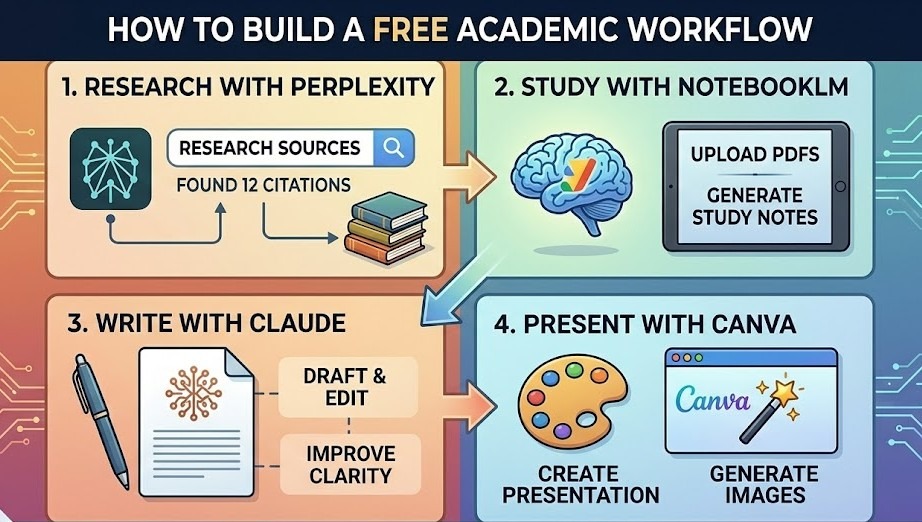
    AI Tools workflow

    The key is knowing which tool to reach for. Don’t use one AI for everything — each has a strength. Claude is brilliant at nuanced writing and explanation. Perplexity is fastest for research. NotebookLM is best when you need accuracy from your own materials. Mix and match, and you’ll outperform students paying for single expensive subscriptions.

    Also, always review AI output. These tools are assistants, not replacements for your own thinking. The students who do best with AI are those who use it to accelerate their work — not hand it over entirely.

    Should you ever pay for AI tools?

    Occasionally, yes. If you’re doing very heavy coding work, you might benefit from a paid GitHub Copilot plan. If you’re writing an essay with hundreds of sources, a paid Zotero or Elicit plan could save time. But for the majority of students handling everyday assignments, research, and presentations, the best free AI tools in 2026 are not only more than enough but also to get the job done — and done well.

    The bottom line

    Free doesn’t mean weak anymore. The best free AI tools for students available today are powerful, fast, and genuinely helpful. Whether you’re writing an essay at midnight, preparing for an exam, or building a presentation, there’s a free AI tool that can help — no credit card required. If you start using even 2–3 of these tools properly, you’ll notice a huge difference in how fast and effectively you study.

    Frequently asked questions

    Everything students commonly ask about free AI tools in 2026.

    Are free AI Tools really good enough for College-level work?

    Yes — in 2026, free AI tools are good enough for college-level work. Tools like Claude, Google NotebookLM, and Perplexity AI can help with essays, research, exams, and presentations. For most student tasks, free plans work perfectly without major limitations.

    Is using AI Tools considered cheating in school or college?

    It depends on your school’s rules. Most colleges allow AI for research and idea help, but not for submitting AI-generated work as your own. Use AI to learn and organize ideas, and always follow your teacher’s guidelines.

    Which free AI Tool is best for writing a essay?

    Claude is one of the best free tools for essay writing. It understands context well, creates clear and structured content, and helps improve drafts. You can use it to refine arguments, edit sections, and simplify sentences for free.

    Can I use AI Tools on my phone?

    Yes! Most tools like Claude, Perplexity AI, and Otter.ai have mobile apps for Android and iOS. Google NotebookLM also works well on mobile browsers, so you can study anytime on your phone.

    Do AI Tools have usage limits I should know about?

    Yes, some tools have limits. For example, Otter.ai offers limited transcription minutes, Perplexity AI limits advanced searches, and Claude has a daily message cap. But these limits are usually enough for regular study. You can avoid them by using different tools for different tasks.

    Are my study materials safe enough when I upload them to AI Tools?

    It depends on the tool. Platforms like Google NotebookLM are generally secure, and most trusted AI tools have clear privacy policies. However, you should avoid uploading sensitive or confidential information and always check the tool’s privacy policy.

    Should I learn to use AI Tools even If I’m not a Tech student?

    Yes, absolutely. AI literacy is becoming as important as basic literature. No matter what your field is, AI tools can save time and improve productivity. Starting early helps you build valuable skills for your future career.

    To know more about AI Tools : click here>>>>

  • The Best AI Study Tools Every Student Needs in 2026

    Artificial intelligence has completely transformed how students learn, research, and prepare for exams. The best AI study tools for students in 2026 are leading this revolution—helping learners study faster, understand concepts deeply, and improve productivity.

    By The Editors·10 min read

    Students today have access to something that previous generations could never imagine: a personal AI tutor and research assistant available for you anytime and anywhere. The best AI study tools in 2026 don’t just save time — they change the quality of learning itself.

    With hundreds of tools flooding the market, we’ve cut through the noise to highlight the best AI study Platforms genuinely worth your time — and your grades.

    blog cover

    — ✦ —

    Why Best AI Study Tools Have Become Essential

    AI has moved from a unique chatbot to a genuine academic partner. The best AI tools today can summarise a 50-page paper in seconds, generate personalised quiz questions, and detect gaps in your understanding before an exam does. For students navigating tight deadlines and heavy reading lists, these tools aren’t shortcuts — they’re force multipliers.

    Tool #1  ·  AI Tutoring & Writing

    claude icon

    Claude (Anthropic)

    Best All-Round Study Companion

    Claude has emerged as one of the best AI study tools for deep academic conversations. Students can paste in textbook chapters, ask Claude to identify key arguments, generate practice questions, and walk through each answer step by step. Its honest approach means it pushes back when your thinking is flawed — not just telling you what you want to hear. That’s what real learning looks like.

    Tool #2  ·  Research & Note-Taking

    NotebookLM (Google)

    Best for Research Papers

    Google’s NotebookLM lets students upload their own source documents — lecture notes, PDFs, journal articles — and query them conversationally. Instead of hunting for a hidden line, you simply ask. It mentions exactly which document it drew from, making it helpful for academic integrity. Among the best AI study tools available, NotebookLM genuinely integrates with your coursework rather than generic web knowledge.

    “The best AI study tools in 2026 don’t replace the effort of learning — they remove the friction that gets in the way of it.”

    Tool #3  ·  Flashcards & Active Recall

    Ani AI icon

    Anki + AI Generation

    Best for Exam Prep

    Active recall is the most evidence-backed study method in cognitive science. Anki’s AI integrations now automatically generate high-quality flashcards from your notes, turning a week’s lectures into a full revision deck in minutes. For high-stakes exam prep, this combination is arguably the most powerful among the best AI study tools in any student’s academic toolkit.

    Tool #4  ·  Conversational Learning & Coding

    Chat GPT icon

    ChatGPT (OpenAI)

    Best for Problem-Solving & Code

    ChatGPT remains one of the best AI study tools among students globally. Its Advanced Voice Mode feels like a real live tutor, while its code interpreter can write, run, debug, and explain code in the same window — making it essential for CS and engineering students. It also excels at maths problem-solving, essay outlines, and debate prep — hard to beat for coding-heavy courses.

    Tool #5  ·  Multimodal Research & Real-Time Info

    gemini icon

    Google Gemini

    Best for Multimodal & Live Research

    Google Gemini stands out among the best AI study tools for its deep integration with the Google ecosystem — Gmail, Drive, and real-time search, all in one conversation. Its multimodal capabilities let you photograph a handwritten equation or textbook diagram and ask Gemini to solve or explain it instantly. It is also very useful for research-related task. For students already in Google Workspace, it’s the natural choice in 2026.

    ToolsBest For Category
    ClaudeDeep ExplanationAI Tutor
    ChatGPTCoding & Problem SolvingAI Assistant
    GeminiReal-Time ResearchAI Assistant
    NotebookLMResearch PaperResearch Tool
    AnkiRevisionFlashCards

    Honourable Mentions Worth Knowing

    Perplexity AI is among the best AI study tools for fast, cited research — it produces web results with source attribution, far superior to traditional search. Grammarly analyses argument structure and logic, not just grammar, making it a top pick for academic writing. Wolfram Alpha remains unmatched for STEM, showing every step of complex equations rather than just the answer.

    How to Use AI Study Tools Responsibly

    The best AI study tools are only as effective as the student using them. Use them to check your understanding after attempting a problem yourself — not instead of it. Always verify your institution’s AI guidelines before using the best AI study tools in assessed work, and stay transparent with your professors.

    The Takeaway

    The best AI study tools in 2026 — Claude, ChatGPT, Google Gemini, NotebookLM, Anki, Perplexity, and Grammarly — cover every stage of the academic workflow. Together, these best AI study tools represent an extraordinary opportunity for students willing to use them thoughtfully. The ones who benefit most won’t use them to skip the work — they’ll use them to do it better.

    For More Similar Blogs Read here>>>>

    — ✦ —

    FAQs

    1. What are the best AI study tools for students in 2026?

    Some of the best AI study tools in 2026 include Claude for academic discussions, ChatGPT for problem-solving and coding, Google Gemini for multimodal research, NotebookLM for research papers, and Anki for exam preparation through spaced repetition.

    2. How do AI study tools help students learn better?

    AI study tools help students summarize complex information, generate practice questions, organize notes, and explain difficult concepts in simple terms. They also allow students to learn at their own pace with personalized explanations.

    3. Are AI study tools allowed in schools and universities?

    Many schools and universities allow AI tools for learning support. However, students should always check their institution’s guidelines before using AI tools in assignments or exams.

    4. Which AI study tool is best for exam preparation?

    Anki with AI-generated flashcards is one of the best tools for exam preparation. Its spaced repetition system helps students remember information more effectively over time.

    5. Can AI study tools replace traditional studying?

    No, AI study tools are meant to support learning rather than replace it. Students still need to practice, think critically, and engage with their course material to achieve real understanding.